 Hub
The tool store that works like a dispensing cabinet.
Badge withdrawals at the tablet, the right drawer shown at once, tooling costs per job, reorders and regrinds on the owner's phone. On the cabinet you already have.
- No special hardware: a tablet and QR labels
- Keeps working without internet
- Free trial in your workshop
Badge in, and go
The operator shows the badge to the tablet on the cabinet: no passwords, no paper. INNOTHub knows who takes what, for which machine and which job.
- Printed QR badge
- Tablet camera or 2D scanner
- PIN for supervisors
Find the tool in seconds
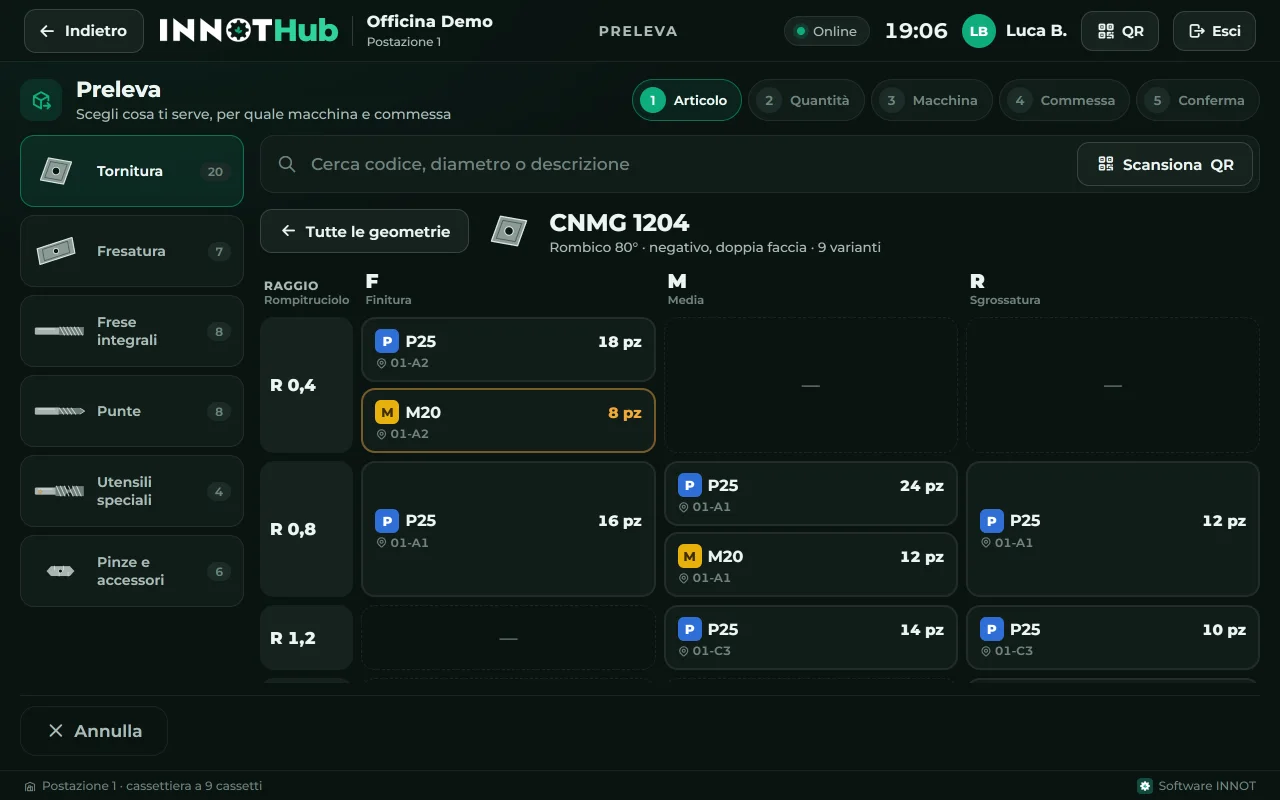
Search by code, diameter or description. Inserts are grouped by geometry: CNMG 1204, then corner radius and chipbreaker in one table, with the quantity in every compartment.
- Inserts by ISO family
- End mills, drills and specials
- QR on every compartment
Machine and job in one tap
Every withdrawal lands on the right job with its cost: at the end you know the tooling cost of every part. Returns, worn and broken tools are recorded the same way.
- Cost per job and per part
- Worn and broken tools
- Holders on the machine
The right drawer, right away
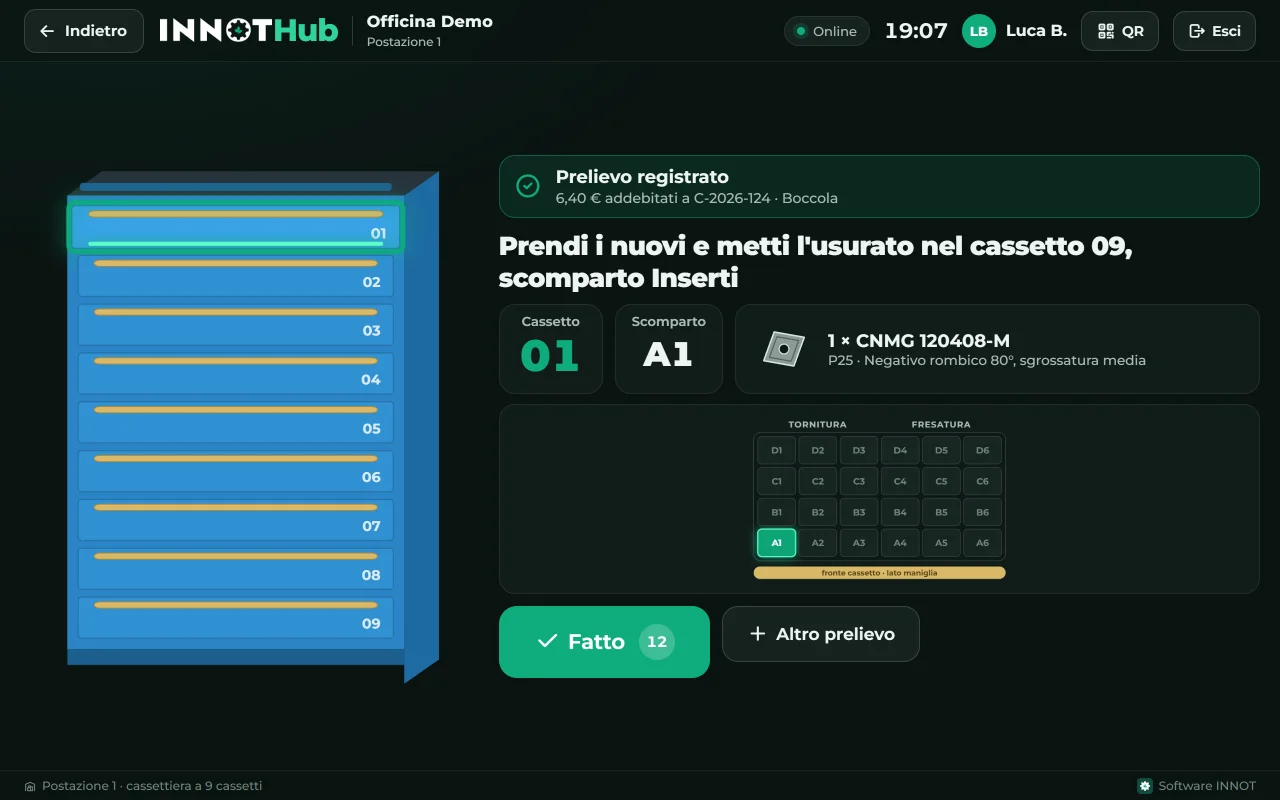
After confirming, the tablet shows drawer and compartment: 01, A1. Nobody searches anymore, nobody opens the wrong drawer. The worn insert goes into the scrap drawer, counted.
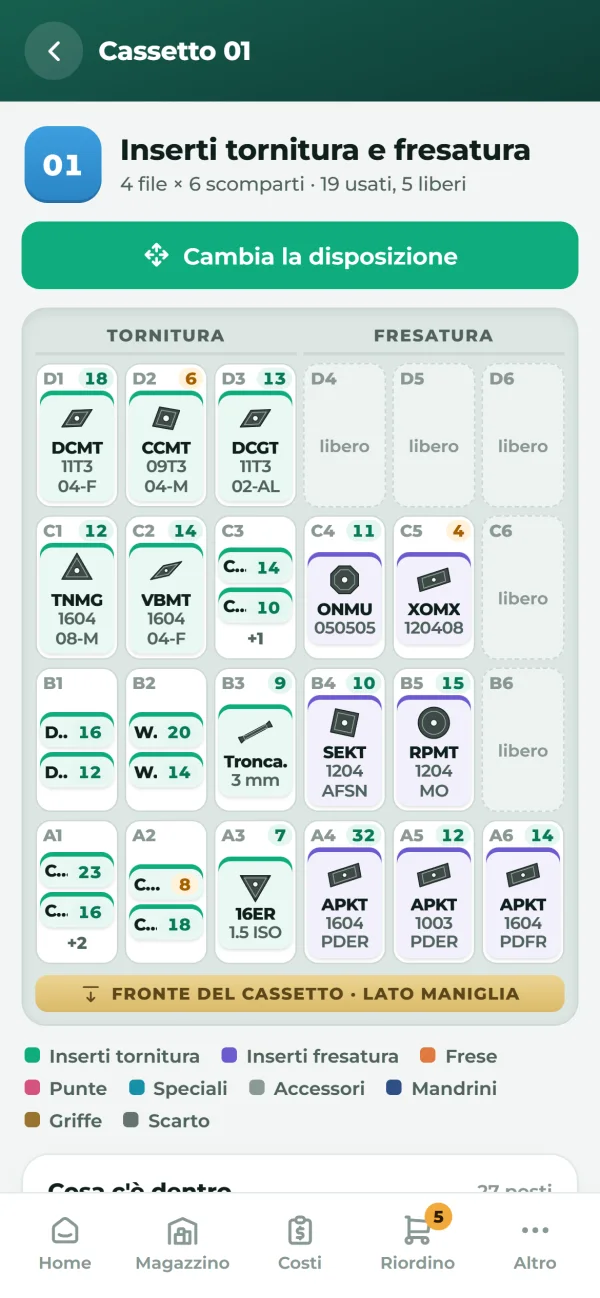
- Map of your cabinet
- Drawers divided like the real ones
- Stocktaking with QR
The owner sees everything, live
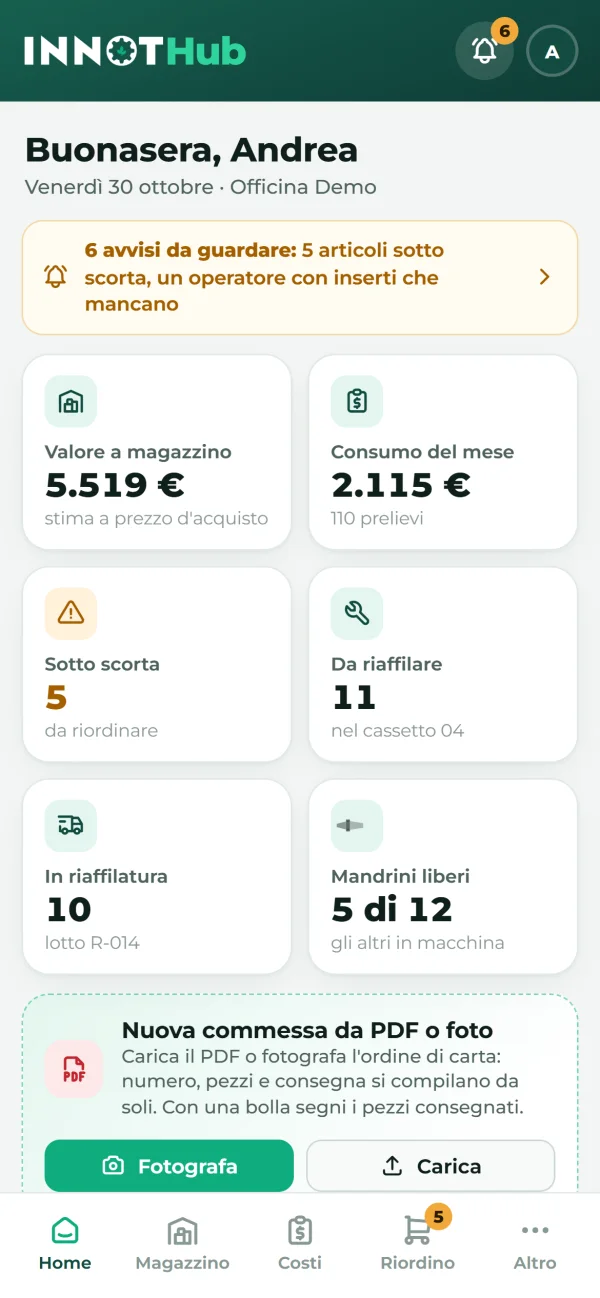
Every movement reaches the owner's phone and computer at once: consumption, costs per job, alerts when an item is running out. If the connection drops, the tablet keeps working and syncs everything when it is back.
- Alerts on the phone
- Monthly PDF report
- Works offline too
Reorders and regrinds under control
Low stock? The message for each supplier is ready, on WhatsApp or by email. Tools to regrind leave in a batch with the printed delivery note and come back by reading the supplier's note from a photo.
- Reorder per supplier
- Regrinding delivery note
- Notes read from a photo
INNOT by your side
INNOTHub is INNOT's software: we set up items, drawers and operators with you, support you during the free trial and see in time what is running out. Data stays on the INNOT server, with automatic backups.
- Free trial in your workshop
- INNOT support
- Automatic backups
Inside the app
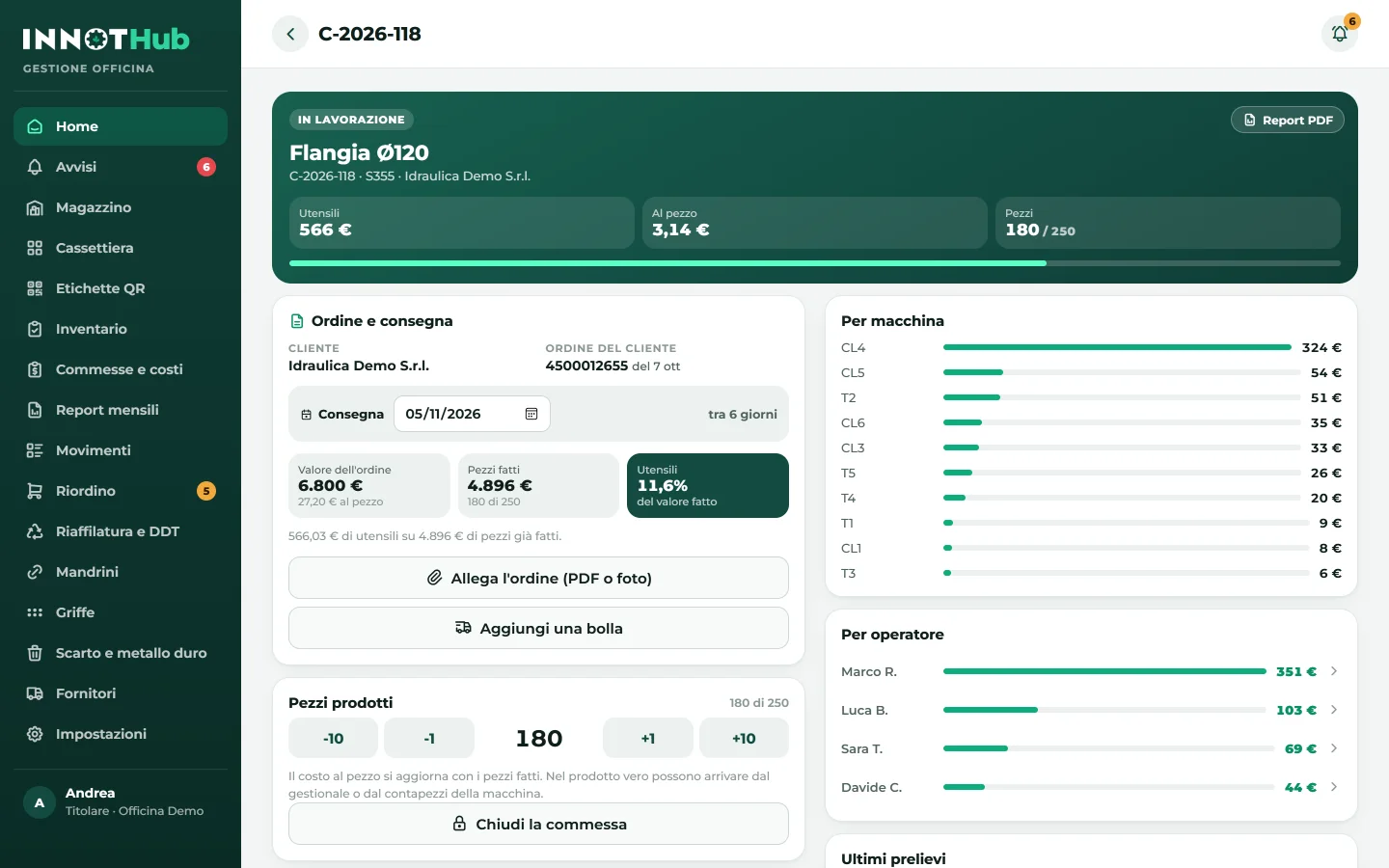
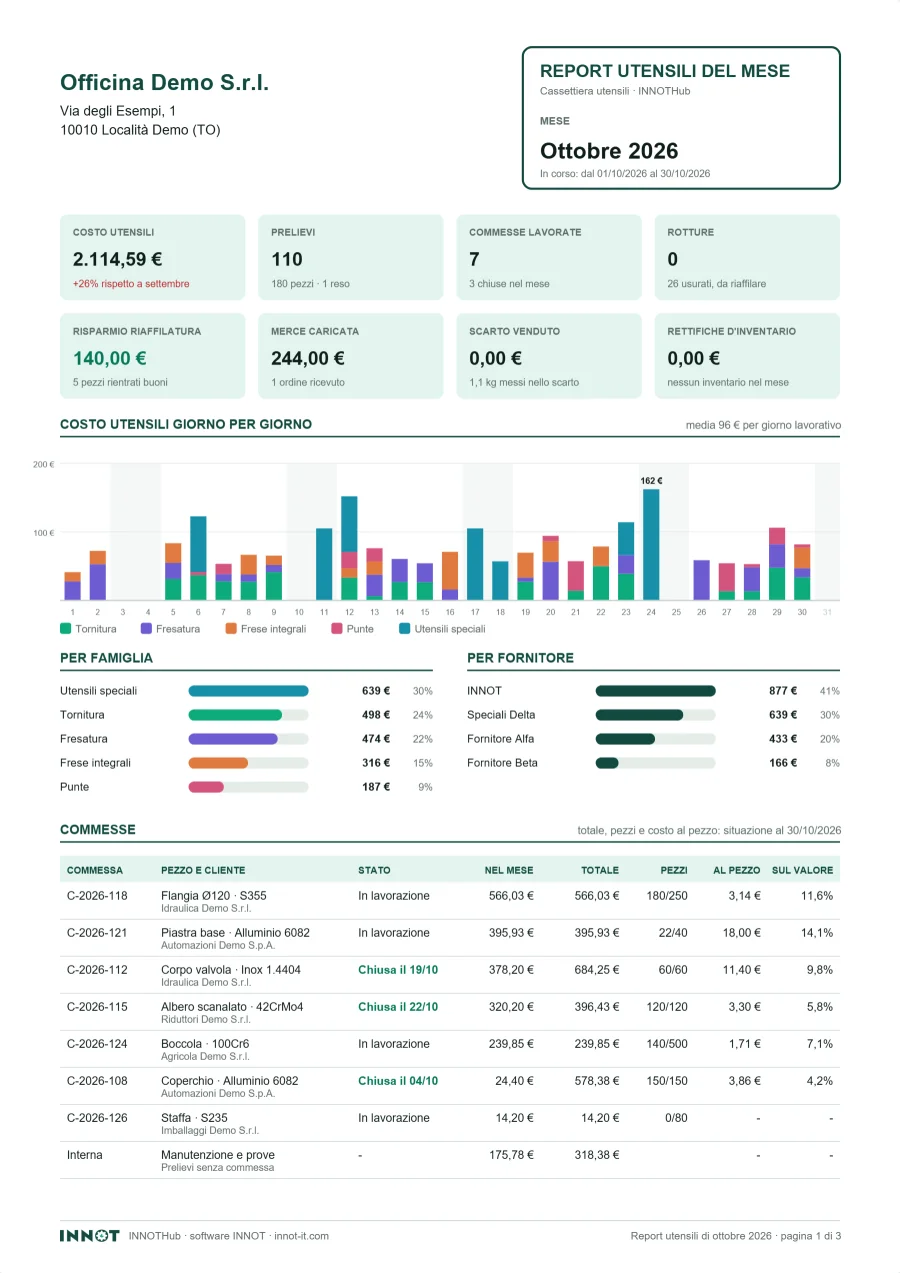
Real INNOTHub screens with the data of a sample workshop (the interface is in Italian). Scroll or drag; open a screen to see it full size.
Everything it does
One app for the station at the cabinet, the owner's phone and computer.
Badge withdrawal
Operator, machine and job in a few taps.
Drawer and compartment
The tablet shows where to take and where to put back.
Inserts by geometry
ISO family, radius and chipbreaker in one table.
QR on every compartment
Scan it with the tablet or a 2D scanner.
Costs per job
Per part, per machine and per employee.
Monthly PDF report
Jobs, machines, breakages and savings.
Alerts on the phone
Item out of stock, missing worn inserts, late batches.
Reorder per supplier
Message ready for WhatsApp or email.
Regrinding with delivery note
Batches, printed note and return from the supplier's note.
Jobs from the PDF
Number, parts and due date fill in by themselves.
Stocktaking with QR
Count compartment by compartment, with the report.
Works offline too
The tablet always works, the server syncs everything.
How to start
Three steps, with INNOT at your side.
- 1
The demo
We send you the link: try it on the tablet, the phone or the computer, with a sample workshop.
- 2
The trial in your workshop
We prepare your space with your items and your cabinet: free trial, no commitment.
- 3
Up and running
Printed badges, QR on the compartments and the tablet on the cabinet. INNOT stays with you afterwards too.
Questions
Do I need a new cabinet?
No. INNOTHub works with the cabinet you already have: a tablet on top and a QR label on every compartment are enough. In the app you divide it like the real one.
Which tablet do I need?
An Android tablet or an iPad with a browser. INNOTHub installs from the page like an app, without going through the store; the same on the owner's phone and computer.
What if the internet goes down?
The tablet keeps working with its own data and sends everything to the server as soon as the connection is back: no withdrawal is lost.
How do operators log in?
With a printed badge with a QR code, read by the tablet camera or by a 2D scanner. Whoever loads goods also has a PIN.
Where is the data?
On the INNOT server, with automatic backups. The owner and INNOT see it, for support; tablets and phones can be disconnected at any time.
How much does it cost?
It depends on stations and services: we decide together after the free trial, with a tailored offer.
Want to see it in your workshop?
We send you the demo link: try it right away on the tablet or the phone.